Sector logbook — information, tasks and daily report, in the field
- By sector or by round
- Read confirmation
- Available offline
Discover Akongo on video
The sector's day, recorded in the field
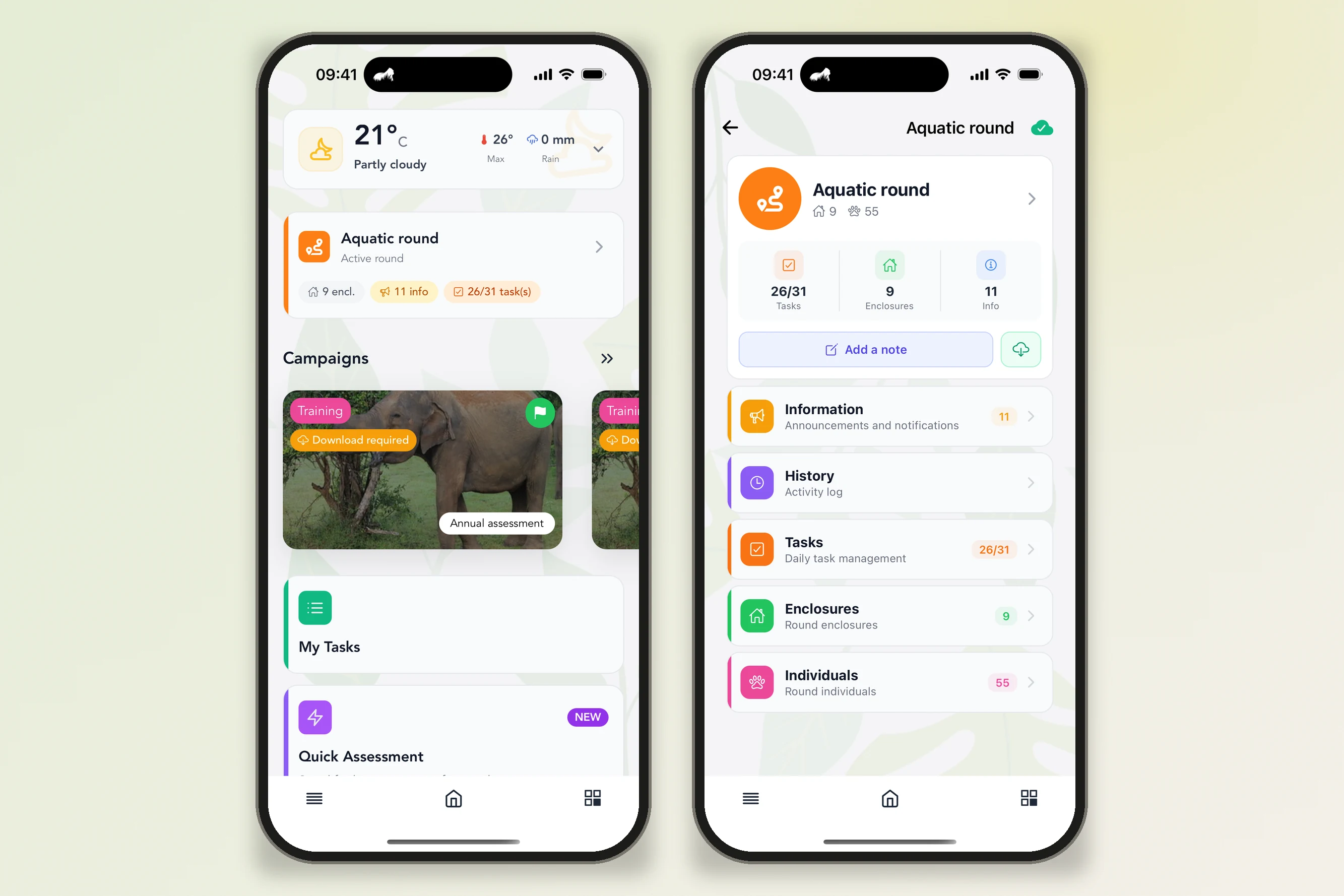
Sector information, read and confirmed
Information published for a sector, an enclosure or a round arrives directly in the app:
- Pinned information
Current announcements are displayed on the sector or round record, with the enclosure concerned.
- Read confirmation
When it is requested, everyone confirms with one tap that they have read the information.
- All information in one place
From the home screen, one screen gathers the information from all your sectors.
- Reporting an observation
A note, with a photo or video if needed, can be added on an individual, an enclosure or the sector, and can notify the people concerned (e.g. vet, nutrition, maintenance). If your facility has enabled it, a note on an individual is also sent to ZIMS.
ZIMS is a trademark of Species360, mentioned here for information. AKONGO is an independent publisher.
Carry out and monitor the sector's tasks
Each task shows its target (sector, enclosure or individual), who is responsible for it, its priority and its due date. In the app:
- My tasks, all tasks
Everyone finds the tasks assigned to them, or all tasks, with filters by period, status, sector and category.
- A status for each task
Start, close, reopen, or mark a task as “failed” with a note explaining why; a task past its due date appears as “Overdue”.
- Routine tasks
Recurring tasks (daily, weekly, monthly…) are scheduled once on the web and arrive in the app on their own.
- One-off tasks
An unplanned intervention (e.g. maintenance, safety, animal check) is created directly in the field, with its target, the person responsible and its due date.
- Administration tasks
Treatments prescribed on a prescription, entered on the web, generate administration tasks, with the treatment period.
Fill in the daily report, alone or together
The sector's or round's daily report is filled in in the app, in the format chosen by the facility on the web:
- Structured report
Blocks by individual, by enclosure or by zone, a summary and completion progress; the draft is saved as you go.
- Alerts during data entry
When a value reaches an alert threshold, the app flags it at the time of entry.
- Animals under treatment
The report lists the sector's animals under treatment, to add a note, a photo or a weight.
- Shared daily report
Several keepers fill in the same report; when their answers differ, the difference is flagged and one person decides which value to keep.
- Free entry and dictation
In free format, everyone adds notes sorted by category; in all formats, text can be dictated by voice.
By sector or by round, even without a network
The app follows the facility's organisation and remains usable in areas without a connection:
- Sector record
Everyone finds their sectors, and each sector brings together its information, tasks, report and history, as well as its enclosures, animals and documents.
- Rounds
When the facility organises work in rounds, everyone chooses theirs: its information, tasks, enclosures, animals and report are displayed together.
- Offline
Sectors, information, tasks and reports are downloaded to the device; what is entered without a network (except videos) is sent automatically once the connection is back.
- Phone or tablet
The app works on Android and Apple, on phones and tablets, and its interface is available in six languages.
What the Sector logbook module changes in the field
Information in one place
Information, tasks and the day's report are brought together in the app, instead of being spread between a paper notebook, a whiteboard and verbal instructions.
Everyone finds what concerns them
Their sectors, their round, their tasks: everyone opens the app on their own scope of work.
No double entry
What is entered in the field (report, tasks, notes) arrives on the web, without having to copy it out at the office.
A report filled in together
Everyone's answers are kept; in case of disagreement, one person decides which value to keep.
Even without a network
In an area without a connection, data entry continues, and sending happens once the network is back.
A record of each day
The sector's history keeps the activity and the photos, and can be consulted later.
A complementary approach
The Digital Sector Logbook programme relies on the mobile app and the web version, which share the same data.
In the field, with Animal Welfare Monitor
Read and confirm information, carry out the day's tasks, create a one-off task, fill in the daily report, report an observation with a photo.
At the office, on the web
Publish information, schedule recurring tasks, record prescriptions, choose the report format, then view the reports, export them as PDF and follow the day's activity, sector by sector.
Take your sector's information into the field
Learn more about our solutions
- Tools
Explore our comprehensive range of tools optimised for managing and analyzing animal welfare data.
- Training
Discover our training organisation and develop your expertise in ethology and animal welfare.