Rapid assessment module — assess, prioritise, act
- About 5 minutes
- Score per category
- Free offer
The rapid assessment, a first step in welfare monitoring
Assessing each species' welfare in detail takes time: full questionnaires, observations, analyses. Before starting this work, you need to know where to focus attention first.
For this, Animal Welfare Monitor offers the rapid assessment. For each group of animals, the official grid asks short questions on four dimensions: feeding, housing, health and behaviour. Keepers answer them on their phone or tablet, at the enclosure.
Repeated across all groups, the rapid assessment gives an overview of the facility: you identify the species to watch, decide where to go further (for example with the species-specific assessments) and follow the effect of the actions put in place.
Co-developed with Parc de Branféré
The rapid assessment grew out of a research project conducted with the Parc animalier et botanique de Branféré, at the park's initiative. The protocol was designed in the field with the zoological teams, tested on a variety of species, then refined with the keepers.Already adopted by around twenty parks in Europe: Zoo de la Flèche, Le Pal, Réserve de la Haute Touche, Montpellier, Citadelle de Besançon, Zoo Landau (DE), Budapest Zoo (HU)…
“With this barometer, for the first time we can quickly review all 195 of our species, while remaining scientifically grounded.”
In the field
Assessing a group at the enclosure
The rapid assessment is done in the app, question by question:
- The group to assess — create the group (name, one or more species, number of individuals if you know it) and, if you wish, link it to a sector: the members of the sector's team are then added to the group.
- The assessment grid — the official Akongo grid or, with the Essentiel and Progress offers, a custom grid from your facility or a grid shared by another facility.
- Short questions, by category — feeding, housing, health and behaviour; a custom grid can add its own categories.
- Photos and videos — take them on the spot or choose them from the phone's gallery; they are added to the group's gallery.
- Notes and comments — add a note to a question, and a comment at the end of the assessment (e.g. territorial behaviour observed, visible health problem).
A result per category, to know where to act
At the end of the rapid assessment, the app displays the group's result:
- Overall score — as a percentage, with a simple reading level: “Excellent”, “Good”, “Average” or “Poor”.
- Score per category — feeding, housing, health and behaviour each have their own percentage score and level, from “Excellent” to “Poor”.
- Colours to spot gaps — each score takes the colour of its level, from green to red: the weakest category can be spotted at a glance.
- Answers and media — every answer, photo, video and note can still be viewed in the assessment details.
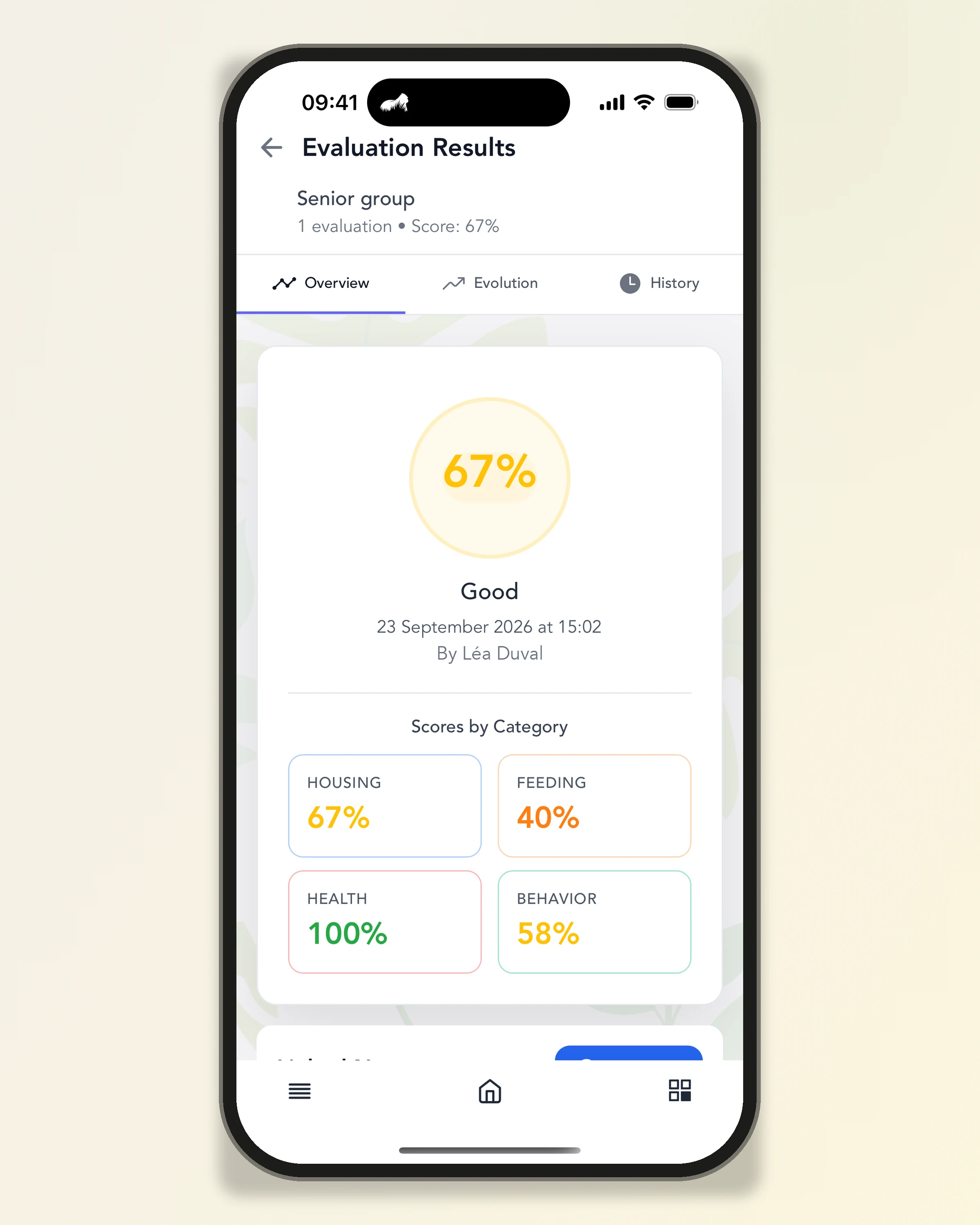
The overall score and the breakdown by category
Objectives and actions
From result to action plan
Each group has its own action plan, shared with the team:
- Objectives — set an objective for a category (e.g. improve enclosure enrichment), with a target score and a deadline, then indicate whether it has been achieved.
- Actions — detail the actions that contribute to it, with a priority, a deadline and, if needed, the person responsible.
- Notes — record your remarks and, if needed, link them to a rapid assessment.
- Archives — archived objectives, actions and notes can still be viewed.
Monitoring of objectives and actions is included in the free Rapid Welfare Assessment offer.
Monitoring over time
Follow how each group changes
By repeating the rapid assessment, you see the effect of the changes put in place:
- Assessment history — each rapid assessment of the group, with its date and the detailed answers.
- Score trends — the curve of the overall score and the category scores, from two assessments onwards.
- Group gallery — the photos and videos taken during assessments, gathered in one place.
- Next assessment — set the date of the group's next rapid assessment; it is displayed in the list of groups, and an overdue date is flagged.
What the rapid assessment changes for your facility
All your species
The official grid applies to all species: you review the whole facility with a single tool.
The same way of scoring
The whole team answers the same questions, with the same grid: results remain comparable from one assessment to the next.
A field tool
Keepers assess on their phone or tablet, at the enclosure, without using paper.
Clear priorities
The categories with the lowest scores stand out at a glance, group by group.
Actions that are followed up
Objectives and actions stay attached to the group, with their deadline and progress.
Free, with no commitment
The Rapid Welfare Assessment offer is free and has no commitment: a starting point to structure your approach.
Connected modules
On a computer, the rapid assessment continues in the other modules of the web version.
- Rapid assessmentOn the web, you find the same groups and their results; with the Essentiel and Progress offers, you can also create your own grids there.Explore module
- TimelineEach rapid assessment is added to the facility's activity feed.Explore module
- DashboardsThe number of rapid assessments carried out is one of the activity indicators.Explore module
- Species assessmentTo look further into an issue identified, the species-specific assessments take over (more than 100 species available).Explore module
Review the welfare of each group, in the field
Learn more about our solutions
- Tools
Explore our comprehensive range of tools optimised for managing and analyzing animal welfare data.
- Training
Discover our training organisation and develop your expertise in ethology and animal welfare.